
New feature
Automations in Kaliper: start with Workflows
Kaliper can do a lot, and it learns to do more every week. You know what that usually means, because you are using the other tools in this industry: every new capability arrives as another screen, another tab of settings, and another month before anyone on the team can use it properly. That trade was unavoidable for a long time: the more finely a system could be tuned, the worse it was to work in.
Ending that is the thing we are working on: people should not be the ones looking at endless tables and clicking a thousand buttons a day. That is what we are building Chat Agents for.
As a next step in that direction we are now developing Automations, and Workflows is the first release.
Right now it is mostly the engine layer. Though it has (and will have) an interface, the future intended workflow author is the Chat Agent.
What is live
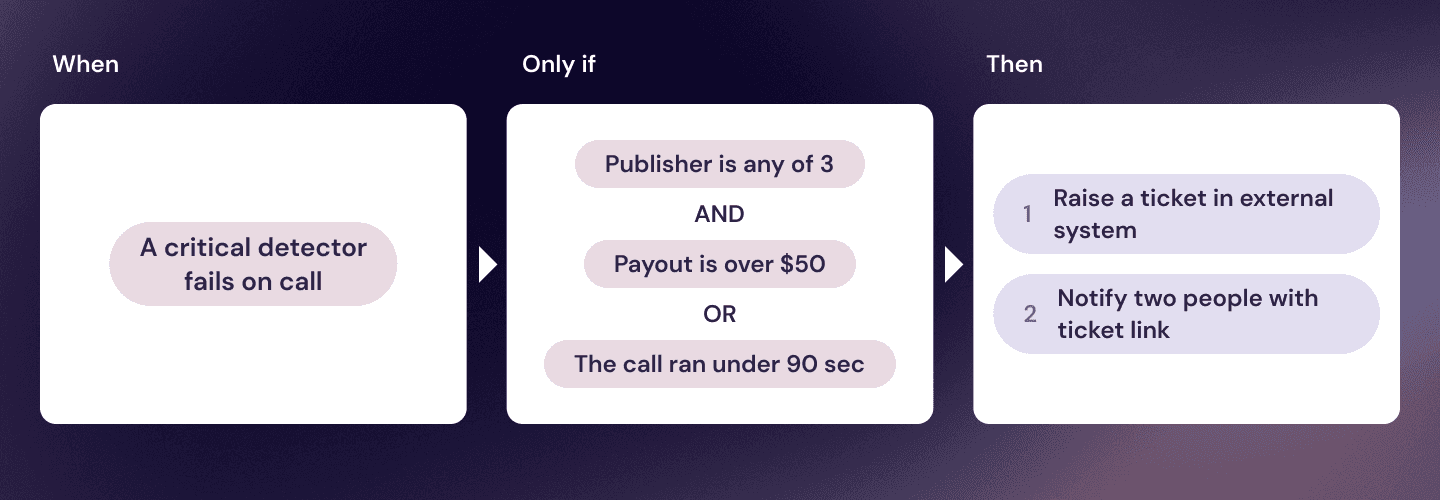
A workflow is a rule of the form "when X happens and conditions Y are met → do Z", bringing previously separate mechanics together in one engine:
the old webhooks (call-webhooks),
hardcoded notifications (red flag, critical detector failed, and so on),
scheduled reports.
In other words, a workflow watches for something to happen, checks whether it is the case you care about, and then does something or tells someone.
Triggers
A workflow starts on an event or on a schedule. Events available now:
Call transcribed/extracted/analysed/flagged;
Detector result/Critical detector failed;
Dataset member matched.
Metric watching is coming soon: a workflow that fires when a metric leaves the range you set, rather than when something happens to a call.
Conditions
Conditions are optional: without them the workflow runs on every event of that type.
Which fields you get depends on the trigger.
Conditions can stack with AND or OR, and groups nest inside groups, so the tree holds your actual business logic rather than one flat filter.
Actions
Two of them are public today:
Report emails a saved view. You pick the view, the window it covers, and who receives it.
Webhook posts to any URL. More on that below.
A third one, AI Agent, is already working and open to beta testers. It asks the Chat Agent a question about the specific firing and hands the answer to the next action. Coming to everyone soon.
Notifications
Each recipient chooses how they hear about it in their own profile, not in your workflow. Anyone can mute a single workflow without dropping off its recipient list, and a channel switched off in a profile stays off everywhere.
Webhooks, or how Kaliper connects to your other tools
Webhook is the general purpose action: anything that accepts an HTTP request (e.g. your CRM, dialer, or a ticketing system) can sit on the other end. Nothing about the receiving side has to be built for Kaliper specifically.
With custom Webhook you can:
Raise a ticket in your system when a critical detector fires on a named scorecard
Post to Slack or Teams the moment a call is flagged
Push a call into your own database or sheet as soon as it is analysed
Call your own API for extra context, then use what comes back in the next action
That last one needs spelling out. Actions run one at a time in the order you put them, and a webhook publishes its response under a name you choose, so a later action can read the status code, the body, or a single field out of the body when the response is JSON.
Test it before you trust it
Every workflow has a Test run. Pick a real call and fire the actions against it.
This is not a preview. It is a real firing with the real worker, so the email actually sends and the webhook actually posts to your URL, which is the only way to find out whether the receiving side accepts what you built. Test firings are marked as tests, stay out of the workflow's history, and never reach your recipients.
Worth knowing
Each workflow has an hourly firing cap. Past it the workflow is marked Capped and drops the rest of the hour. If your case needs more than they allow, tell us and we will raise them for your account.
A workflow pointing at a deleted detector or an archived publisher is marked broken in the list.
Schedules are hourly, daily or weekly. There is no raw cron field, and that is deliberate.
How to start
Open Activity, go to Settings, and you will find workflows already there that we set up for your account. Look at those first. Editing one that fires correctly is a better way in than an empty form.
To build your own: create a workflow, name it, pick a trigger, narrow it with conditions, add actions if you need them, and add the people who should hear about it. Run a test before you turn it on.
If you would rather just say what you want to happen, tell us and we will set it up with you.
What comes next
Branching. Actions today are a straight line: up to five, one after another, and a failure ends the run. Next comes conditions between actions, so a step decides what runs after it, branches that merge back together, and one step that fans out into several.
The AI Agent task. It tasks the Kaliper Agent and puts the result where the next action can read it, so a workflow can do almost anything.
Seasonal alerts. An alert inside a workflow currently watches a fixed range. Judging a metric against its own normal value for that hour and that weekday still lives in the old alert module.
And then the part this was built for. Every capability above is something you would otherwise assemble by hand in an editor. The plan was never for you to do that. You describe the rule in a sentence, the Chat Agent assembles the workflow, and the editor becomes the place you go to check its work rather than the place you go to do the work. After that it stops writing rules and starts acting on what it finds.
So: what have you always wanted to happen automatically, and never had a way to set up? That is the most useful thing you can tell us right now!