
New feature
Chat Agent is live!
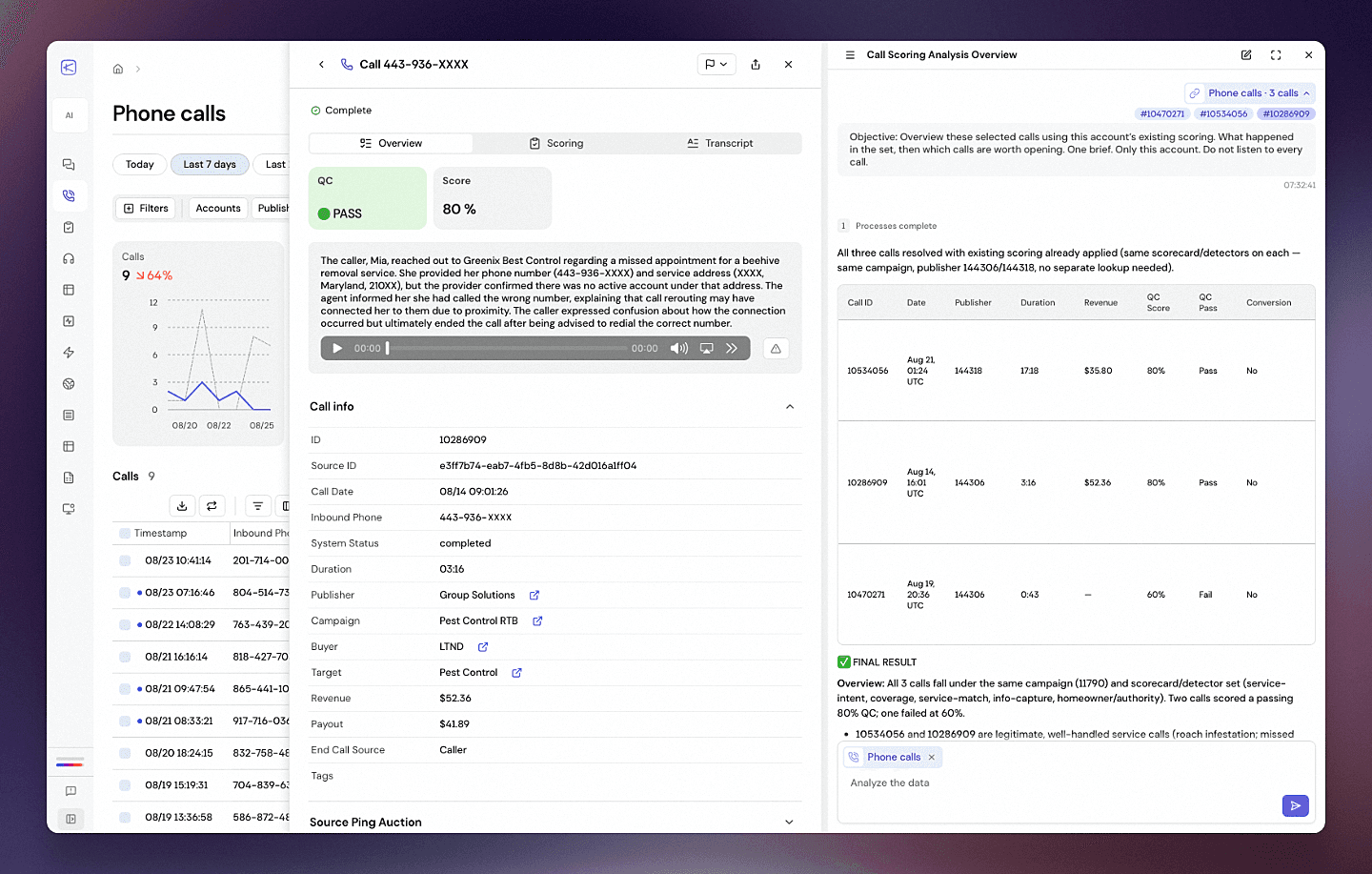
Ask about your calls, pings, coverage and scoring in plain language.
You already know the questions you want answered. Which publisher went bad last week, what those QC failures actually cost you last month, whether that buyer is capping out again. But getting to an answer used to mean building a complicated report first, so most of these questions simply never got asked.
Now you type the question and it goes and works it out.
It will do week over week comparisons on your metrics; the full conversion funnel with the drop off at each stage; conversion by hour of day; or a deep dive on a single publisher or buyer covering volume, conversion, and payout together.
Why this is not a generic chatbot
It speaks pay-per-call, and it knows which words in this business carry two meanings.
It already knows what you are looking at. You can open it from Calls, Ping Control, Pings or Coverage and it takes the view as you have it filtered. Change a filter while the panel is open and the scope follows. If you have rows ticked, the question is about exactly those rows.
If your question is wider than one page data, run it in its full Chat Agent window.It will never lie about what it actually analyzed. When a question is too big to finish in one pass, it says where it stopped and what it did cover, instead of handing you a table that looks complete and was built from half the data.
The answer format depends on what you asked for. Rankings arrive as tables rather than a paragraph, trends as charts, anything geographic on a map.
What operators are asking it
"Which publishers had the worst critical fail rate last month, minimum 20 scored calls, and which detectors are they failing?"
"How much payout went to calls that failed a critical QC check, versus total payout?"
"How many calls hit a cap, and which buyers capped most often?"
"What share of pings were accepted last month, and what were the top rejection reasons?"
"Where are my biggest coverage gaps by state: high volume, low conversion rate?"
"Export a CSV of my top 15 publishers by revenue, with call volume and conversion rate."
"Design a fraud score for my publisher sub-IDs from short calls, high critical fail and low conversion, then list the 10 most suspicious."
How to start
Open the Chat Agent window, or go to Calls, Ping Control, Pings or Coverage and click Agent button in the top right. To ask about specific records, tick them first and use Ask about selection.
What comes next
Right now the agent waits for you to ask, and it only reads your data. The agent has no ability to create, change or delete anything in your account. There is no write operation available to it at all.
Next we will add agentic workflows, so you can build routines of your own that trigger subagents and webhooks, or send notifications and reports.
From there the logical step is agents that act on what they find: moving a cap, pausing a publisher, editing a scorecard. But we understand the risks and the responsibility that come with it, so we will be consulting you, our clients, at every step.
Try Chat Agent now! Open the agent, ask your questions, and share your feedback with us.
Safety measures we use to protect your data
It works under its own key, not yours. Every organization gets a separate access key issued for the agent, and that key is accepted only on endpoints that read. It is held on our servers, is never sent to your browser, and is never shown to the model. It can be revoked or replaced without touching any of your other integrations.
The key is checked against the person using it. Before a session begins, we confirm the key belongs to the account that signed in, so the agent cannot be pointed at another organization's data.
A request cannot name an organization. The organization comes from the key alone. Every incoming request is walked in full, and if it tries to specify an organization anywhere inside it, the request is rejected rather than answered.
Sensitive configuration is removed before anything reaches the model. Buyer webhook addresses, headers and request bodies, links to call recordings, and anything resembling a token or password are stripped out.
Sessions are short. Access tokens last five minutes, and if an organization is switched off, tokens already issued stop working within a minute.
Calculations run sealed off. When a question requires real computation, the agent writes and runs it inside a container with no network connection, no view of any file system outside its own workspace, and fixed ceilings on memory, processor, running time and output size. The container is destroyed when the call ends, and nothing can be installed into it.
Traffic is encrypted in transit, and storage is encrypted at rest, including database volumes and backups.